Python for Absolute Beginners: Step-by-Step Guide to Your First Program

Starting your journey in programming can feel intimidating. But with Python for Absolute Beginners, you have a friendlier entry point. Python’s simple syntax, readability, and wide applications make it ideal for anyone just starting.
In this guide, we’ll cover everything you need to:
- Set up Python on your computer
- Understand Python syntax basics
- Write your first simple programs
- Explore essential concepts to continue your learning journey
By the end, you’ll feel confident taking your first steps in the coding world and ready to explore more advanced Python projects.
Why Learn Python Programming as a Beginner?
Here’s why Python programming is perfect if you’re just starting:
- Easy to Read: Python looks almost like English. This helps beginners focus on logic instead of syntax.
- Versatile Applications: From web development to data analysis, Python skills are in demand.
- Strong Community: Millions of developers share tutorials, guides, and solutions online.
- Cross-Platform: Works on Windows, macOS, and Linux.
Learning Python for absolute beginners gives you a solid foundation to build not just programs, but a future tech career.
Setting Up Python on Your Computer
Before coding, you need to install Python. Here’s a simple step-by-step guide:
- Download Python: Go to python.org and choose the version suitable for your operating system.
- Install Python: Run the installer and make sure to check “Add Python to PATH”. This lets you run Python from your terminal.
- Verify Installation: Open the terminal or command prompt and type python --version. Seeing a version number means Python is ready!
- Choose an IDE: While you can write code in a text editor, IDEs like PyCharm, VS Code, or Python’s IDLE make coding easier with features like auto-complete and debugging.
Once your setup is complete, you can begin writing your first program.
Understanding Python Syntax
Python is beginner-friendly, but there are some rules you need to know:
- Variables: Store data for later use. You don’t need to declare the type.
name = "Alex"
age = 20
- Indentation: Python uses indentation to define code blocks.
if age > 18:
print("You are an adult.")
- Comments: Use
#to leave notes for yourself or others.
# This is a comment
- Print Statement: The easiest way to display something.
print("Hello, World!")
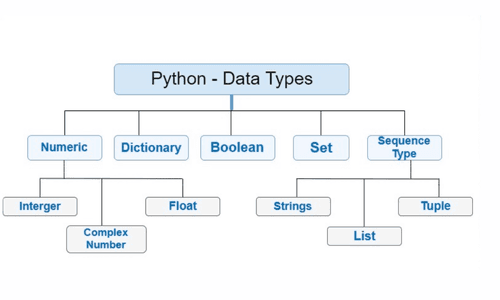
- Data Types: Common types include
strings,integers,floats,booleans,lists,tupleanddictionaries.
These basics form the foundation for writing your first programs confidently.
Writing Your First Python Program
Let’s create a program that greets the user:
# Asking for user input
name = input("Enter your name: ")
print("Hello, " + name + "! Welcome to Python.")
Here’s what’s happening:
- Variables: name stores the user input
- Input:
input()lets users type information - Output:
print()shows a message on the screen
It’s simple, yet powerful — and it introduces you to key programming concepts.
Once you’ve written your first program, start exploring these essential topics:
1. Data Types and Variables
Store and manage information using:
- Strings:
"Hello" - Integers:
10 - Floats:
10.5 - Lists:
[1, 2, 3] - Dictionaries:
{"name": "Alex", "age": 20}
2. Conditionals
Make decisions in your program:
if age >= 18:
print("You can vote")
else:
print("You cannot vote yet")
3. Loops
Repeat tasks efficiently:
for i in range(1, 6):
print(i)
4. Functions
Write reusable code:
def greet(name):
print("Hello, " + name + "!")
greet("Alex")
These building blocks are the key to creating more advanced Python projects for beginners.
Tips to Stay Motivated as a Beginner
Learning to code takes time, but these tips can keep you moving forward:
- Practice Regularly: Even 20–30 minutes a day helps
- Start Small: Simple projects like calculators or text games are perfect
- Learn from Mistakes: Errors help you understand programming better
- Engage with the Community: Forums like Stack Overflow are great for support
- Use Resources: Tutorials, blogs, and Python documentation can guide you
Real-World Applications of Python Programming
Learning Python programming opens many doors:
- Web Development: Build websites with frameworks like Django or Flask
- Data Analysis: Work with large datasets using Pandas or NumPy
- Artificial Intelligence: Create AI and machine learning models using TensorFlow or PyTorch
- Automation: Automate tasks such as sending emails or organising files
These examples show how Python for absolute beginners is not just learning a language, but gaining practical skills for real-world applications.
Final Thoughts
Starting with Python for absolute beginners is an exciting first step into programming. Its simple syntax, readability, and versatility make it perfect for those taking their first steps in coding.
Remember:
- Begin small and stay consistent
- Experiment with mini-projects
- Don’t fear mistakes; they’re part of learning
Every expert programmer started with a single line of code. Today, your journey begins with Python, and with practice, you’ll soon be ready to tackle advanced concepts and projects.
Written by
Shreyashri
Last updated
7 March 2026